# How to Show Now Playing in Spotify with Next.js
On this website, I use Spotify API to show what song is currently playing. Now, I will try to explain on how do I do that.
Next.js has a built-in API in a single application, so choosing Next.js is a perfect choice so we don't expose our API keys.
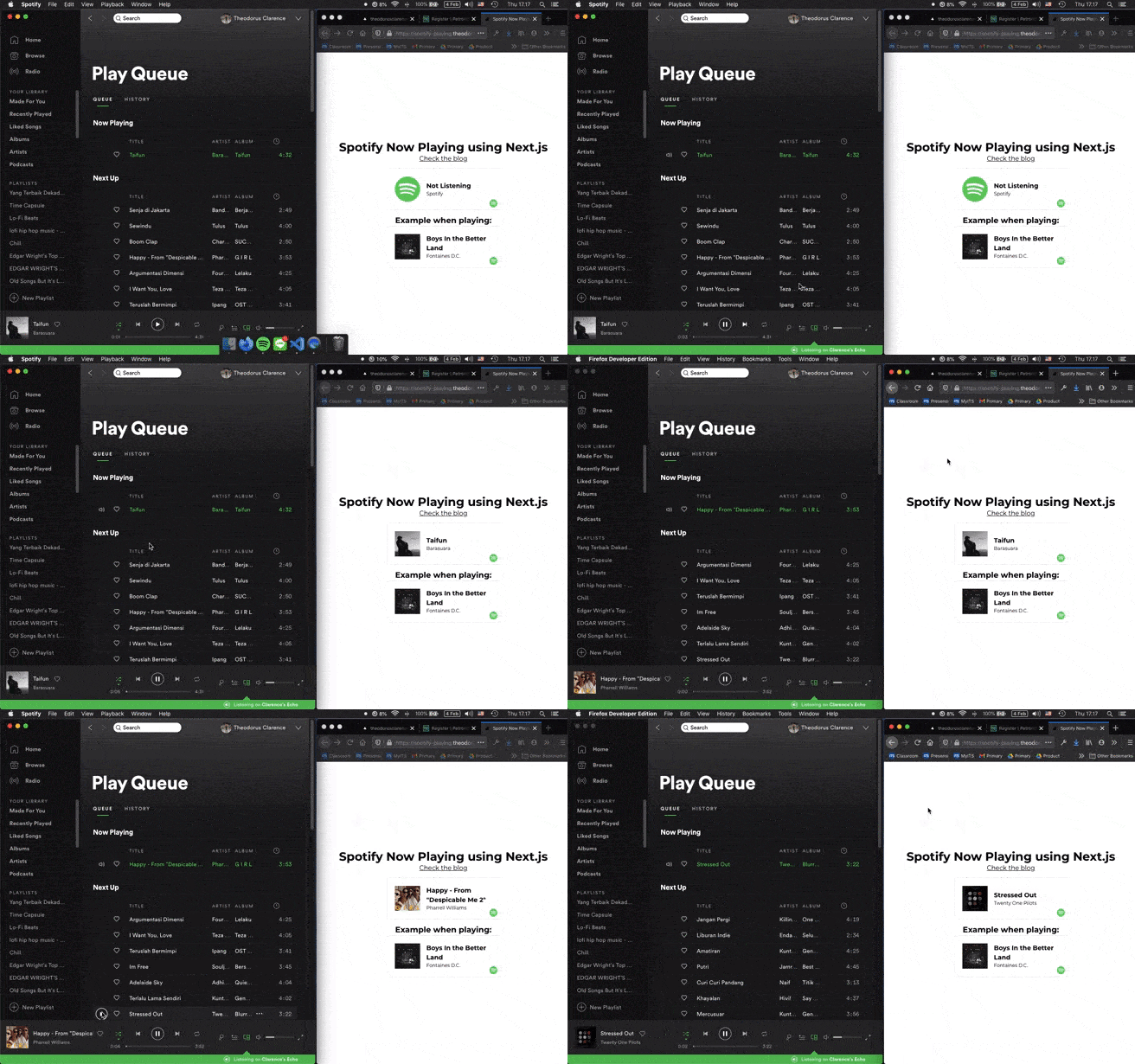
[Website Demo](https://spotify-playing.theodorusclarence.com)
---
## 1. Create an Application on Spotify Developer
- Go to [Spotify Developer](https://developer.spotify.com/dashboard/applications) Website.
- Click **Create An App**
- Fill in App Name, App description, then **Create**

- Next, you will be provided with `Client ID` and `Client Secret` (Don't give this secret to anyone)

- Open edit settings, then fill out `http://localhost:3000` on RedirectURIs

The first step is done! Now, you need to do authentication to get access & refresh token
---
## 2. Authenticate Your Account
To do authentication, we need to prepare `CLIENT_ID` and put it into this link below:
```text
https://accounts.spotify.com/authorize?client_id=CLIENT_ID_HERE&response_type=code&redirect_uri=http
%3A%2F%2Flocalhost:3000&scope=user-read-currently-playing
```
example:
```text
https://accounts.spotify.com/authorize?client_id=eaccb97f6d0e405897adf1dd80b95c01&response_type=code&redirect_uri=http
%3A%2F%2Flocalhost:3000&scope=user-read-currently-playing
```
Open that link in a browser, then you will get redirected into a uri, copy the website link
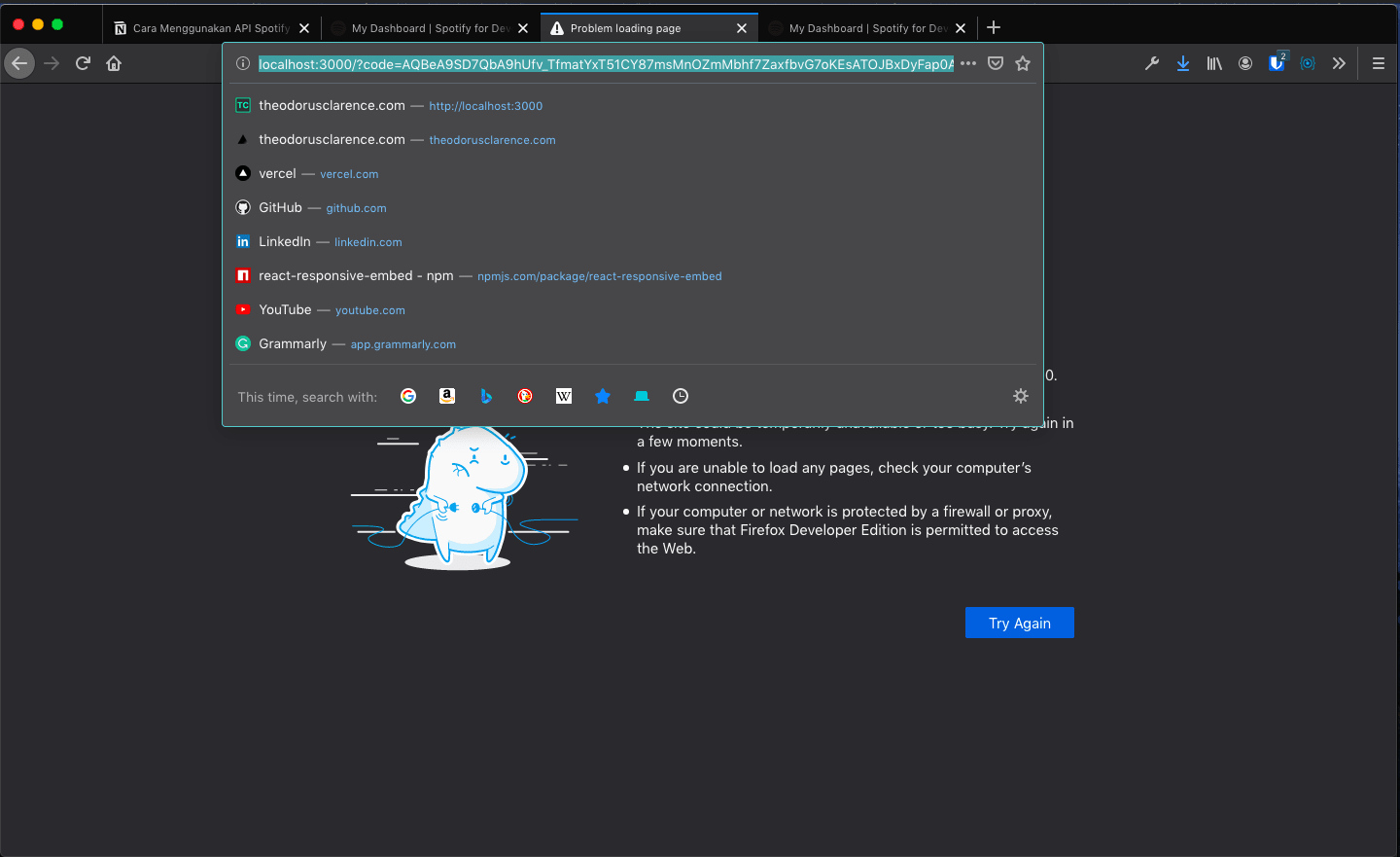
Example of the redirect link:
```text
http://localhost:3000/?code=AQBeA9SD7QbA9hUfv_TfmatYxT51CY87msMnOZmMbhf7ZaxfbvG7oKEsATOJBxDyFap0Aq6uftY0v4Hq1QSy3MgQBfAHhmrifty-62rfDRlFnd0AzXRBOMpoOSA6SNw_uTPp7AixAE5zosgiIIf7efhzf1QOJfLh1HUYi248z8jk1x2jjKG2YLvMyJuP0rjB5tP5UHjoFGBvKbULpchkF6yiJHnS
```
`code` that you have is the one after (=). Don't forget to write it down.
Next we need to get authorization client that is already encrypted with base64, use this [website](https://www.base64encode.org) to encrypt with the format of `client_id:client_secret`
For example:
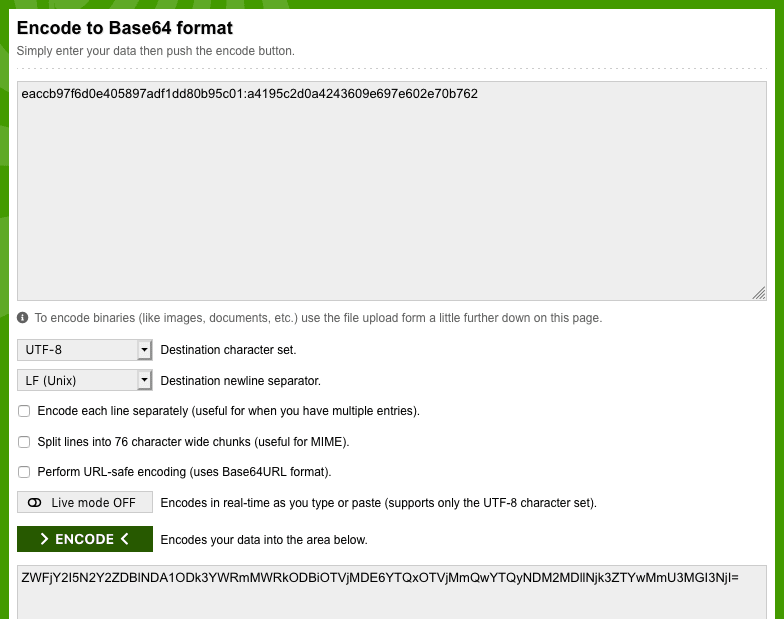
Next, write down the encrypted `base64`
After that, open up terminal/cmd, and run this command, don't forget to change the `base64` and the `code` to yours.
```bash
curl -H "Authorization: Basic CHANGE_BASE64_HERE"
-d grant_type=authorization_code -d code=CHANGE_CODE_HERE -d redirect_uri=http%3A
%2F%2Flocalhost:3000 https://accounts.spotify.com/api/token
```
\*make sure the command is in one line
Example:
```bash
curl -H "Authorization: Basic ZWFjY2I5N2Y2ZDBlNDA1ODk3YWRmMWRkODBiOTVjMDE6YTQxOTVjMmQwYTQyNDM2MDllNjk3ZTYwMmU3MGI3NjI=" -d grant_type=authorization_code -d code=AQBeA9SD7QbA9hUfv_TfmatYxT51CY87msMnOZmMbhf7ZaxfbvG7oKEsATOJBxDyFap0Aq6uftY0v4Hq1QSy3MgQBfAHhmrifty-62rfDRlFnd0AzXRBOMpoOSA6SNw_uTPp7AixAE5zosgiIIf7efhzf1QOJfLh1HUYi248z8jk1x2jjKG2YLvMyJuP0rjB5tP5UHjoFGBvKbULpchkF6yiJHnS -d redirect_uri=http%3A%2F%2Flocalhost:3000 https://accounts.spotify.com/api/token
```
You will get a JSON like this:
```json
{
"access_token": "BQDKxO7h1I1wA3esGK9zCFWn97XORJEPjwAHAEIxCnDXcmy9GbEuPacquwWvpiM4d33gJVHVOP9KUxY8AXkpXc-_zRFZBfneHM2vEeV1Fbfr-0Mw94oimlNf77dRiyxPpm4IUVNLloUWgYcfkAO0",
"token_type": "Bearer",
"expires_in": 3600,
"refresh_token": "AQAtxXvnzRTt4c2-2_Av2WyJQKWxUW_hMVN6QNiqv2i8A2ZElVarmvdhqyc8Pf-Z5n827FTFxTpHq5E3kOsrlRWM3TuJWxjVQsW0icR0zo3BXRFLt2FB2Qfj-pFaZwY-qc8",
"scope": "user-read-currently-playing"
}
```
Example on the terminal:

what we need to write down is the `refresh_token`. That token will last infinitely
Now you can do the request with Next.js or another backend application
---
## 3. Creating API routes in Next.js
If you need a reference to create the app, you can [check my repository](https://github.com/theodorusclarence/now-playing-spotify). Don't forget to star it!
You can also use my [nextjs-tailwind-starter](https://github.com/theodorusclarence/nextjs-tailwind-starter) by using:
```bash
npx create-next-app -e https://github.com/theodorusclarence/nextjs-tailwind-starter project-name
```
After all app is installed, add querystring dependency
```bash
yarn add querystring
or
npm i querystring
```
Next, make an api route in /pages/api/spotify.js
If you want the TypeScript version, checkout the code on [GitHub](https://github.com/theodorusclarence/theodorusclarence.com/blob/main/src/pages/api/spotify.ts)
```jsx
// /pages/api/spotify.js
import querystring from 'querystring';
const {
SPOTIFY_CLIENT_ID: client_id,
SPOTIFY_CLIENT_SECRET: client_secret,
SPOTIFY_REFRESH_TOKEN: refresh_token,
} = process.env;
const basic = Buffer.from(`${client_id}:${client_secret}`).toString('base64');
const NOW_PLAYING_ENDPOINT = `https://api.spotify.com/v1/me/player/currently-playing`;
const TOKEN_ENDPOINT = `https://accounts.spotify.com/api/token`;
const getAccessToken = async () => {
const response = await fetch(TOKEN_ENDPOINT, {
method: 'POST',
headers: {
Authorization: `Basic ${basic}`,
'Content-Type': 'application/x-www-form-urlencoded',
},
body: querystring.stringify({
grant_type: 'refresh_token',
refresh_token,
}),
});
return response.json();
};
export const getNowPlaying = async () => {
const { access_token } = await getAccessToken();
return fetch(NOW_PLAYING_ENDPOINT, {
headers: {
Authorization: `Bearer ${access_token}`,
},
});
};
export default async (_, res) => {
const response = await getNowPlaying();
if (
response.status === 204 ||
response.status > 400 ||
response.data.currently_playing_type !== 'track'
) {
return res.status(200).json({ isPlaying: false });
}
const data = {
isPlaying: response.data.is_playing,
title: response.data.item.name,
album: response.data.item.album.name,
artist: response.data.item.album.artists
.map((artist) => artist.name)
.join(', '),
albumImageUrl: response.data.item.album.images[0].url,
songUrl: response.data.item.external_urls.spotify,
};
res.status(200).json(data);
};
```
Add .env.local with authorization data that we have written (change the data below with yours)
```text
SPOTIFY_CLIENT_ID=eaccb97f6d0e405897adf1dd80b95c01
SPOTIFY_CLIENT_SECRET=a4195c2d0a4243609e697e602e70b7
SPOTIFY_REFRESH_TOKEN=AQAtxXvnzRTt4c2-2_Av2WyJQKWxUW_hMVN6QNiqv2i8A2ZElVarmvdhqyc8Pf-Z5n827FTFxTpHq5E3kOsrlRWM3TuJWxjVQsW0icR0zo3BXRFLt2FB2Qfj-pFaZwY-qc8
```
Your API is ready with route: `GET https://localhost:3000/api/spotify`
---
## 4. Use API with Next.js
For data fetching, we can use [SWR](https://www.google.com/url?sa=t&rct=j&q=&esrc=s&source=web&cd=&cad=rja&uact=8&ved=2ahUKEwjm6NXChrfuAhVEeX0KHZB4BjwQFjAAegQICxAC&url=https%3A%2F%2Fswr.vercel.app%2F&usg=AOvVaw0gJGo0q67gd371C_Ax1J7k). SWR is a great library that can fetch the API periodically. SWR will do refetching each time we refocus a the window. Also, install react-icons to get the spotify logo.
```bash
yarn add swr react-icons
or
npm i swr react-icons
```
Add SWR in pages/index.jsx like this:
[TypeScript Version](https://github.com/theodorusclarence/theodorusclarence.com/blob/main/src/components/layout/Spotify.tsx)
```jsx
import useSWR from 'swr';
export default function Home() {
const fetcher = (url) => fetch(url).then((r) => r.json());
const { data } = useSWR('/api/spotify', fetcher);
return (
<>
{console.log(data)}
);
}
```
There will be 2 types of JSON data that will be sent by the Spotify API:
1. When there is no song playing
```json
{
"isPlaying": false
}
```
2. When there is a song playing
```json
{
"album": "Menari Dengan Bayangan",
"albumImageUrl": "https://i.scdn.co/image/ab67616d0000b273d623688488865906052ef96b",
"artist": "Hindia",
"isPlaying": true,
"songUrl": "https://open.spotify.com/track/08OPqLv99g8avzmxQepmiw",
"title": "Besok Mungkin Kita Sampai"
}
```
So, we can conditionally render the data like this:
```jsx
```
You can check out the live deployment on [spotify-playing.theodorusclarence.com](https://spotify-playing.theodorusclarence.com)
### Thanks and Goodluck!
---
> Originally posted on [my personal site](https://theodorusclarence.com/?ref=hashnode), find more [blog posts](https://theodorusclarence.com/blog?ref=hashnode) and [code snippets library](https://theodorusclarence.com/library?ref=hashnode) I put up for easy access on my site 🚀
Like this post? [Subscribe to my newsletter](https://theodorusclarence.com/subscribe?ref=hashnode) to get notified every time a new post is out!
 ) : (
) : (